From a scan to a clear repair report
An interactive example of the journey. Nothing here submits a real repair.
The QR code connects the report to this location from the start.
Interactive example- Scan
- Describe
- Review
Step 1 of 3
1. Start at the right property
Imagine scanning the QR code at Example House · Flat 2. The reporting route already identifies the location.
2. Explain the problem
3. Ready for the landlord to review
- Property
- Example House · Flat 2
- Issue
- Urgency
- Attachment
- Example status
- New
The location, issue and supporting information belong to the same repair record. This is a preview only; no report has been sent.
When something goes wrong in a rental property, the first few minutes matter. Not because every repair is an emergency, but because poor information at the start creates extra work later.
A message such as “the heating isn't working” may leave the landlord asking which property, which room, when it started, what the tenant has already tried and whether there is anything visible that would help explain the problem.
Propvestra's QR code reporting system gives that first contact a clearer structure. The tenant gets a simple route to report the issue, while the landlord or property manager receives a report connected to the correct property or unit.
Scan it with your phone
This demo opens the tenant repair form. In Propvestra, each reportable property or unit can have its own permanent QR route.
What is QR code tenant repair reporting?
QR code tenant repair reporting gives a tenant a direct link from the physical property to its maintenance reporting page.
Instead of giving every tenant a generic email address or asking them to remember a website, the landlord can make a QR code available at the property. The tenant points their phone camera at it and follows the link.
With Propvestra, that QR route is tied to the relevant property or reportable unit. This means the system can already know where the report belongs before the tenant starts typing.
Property or unit → QR code → Tenant report → Landlord / property manager → Progress → Resolved
Step 1: the landlord creates the property or unit
The process starts inside the landlord's Propvestra account. A property can be added to the portfolio and, where needed, organised into individual reportable units.
For a normal single let, the whole house or flat may be the reportable location. For an HMO or another multi-unit setup, the landlord may want reports connected to a particular room, flat or unit instead.
That structure becomes useful later because the maintenance report does not arrive as an isolated message. It arrives with the location already attached to it.
Step 2: the property gets a permanent QR reporting route
A reportable property or unit can have its own permanent QR code. It is not a disposable code that needs replacing every time somebody reports a fault.
The landlord can make the code available wherever it makes sense for that property — for example with tenant information or in an appropriate shared area.
From the tenant's point of view, the instruction can be as simple as: if you need to report a repair, scan here.
That removes the small bits of friction that often delay a report: finding an old email, searching for a phone number or wondering whether the landlord, agent or property manager should be contacted first.
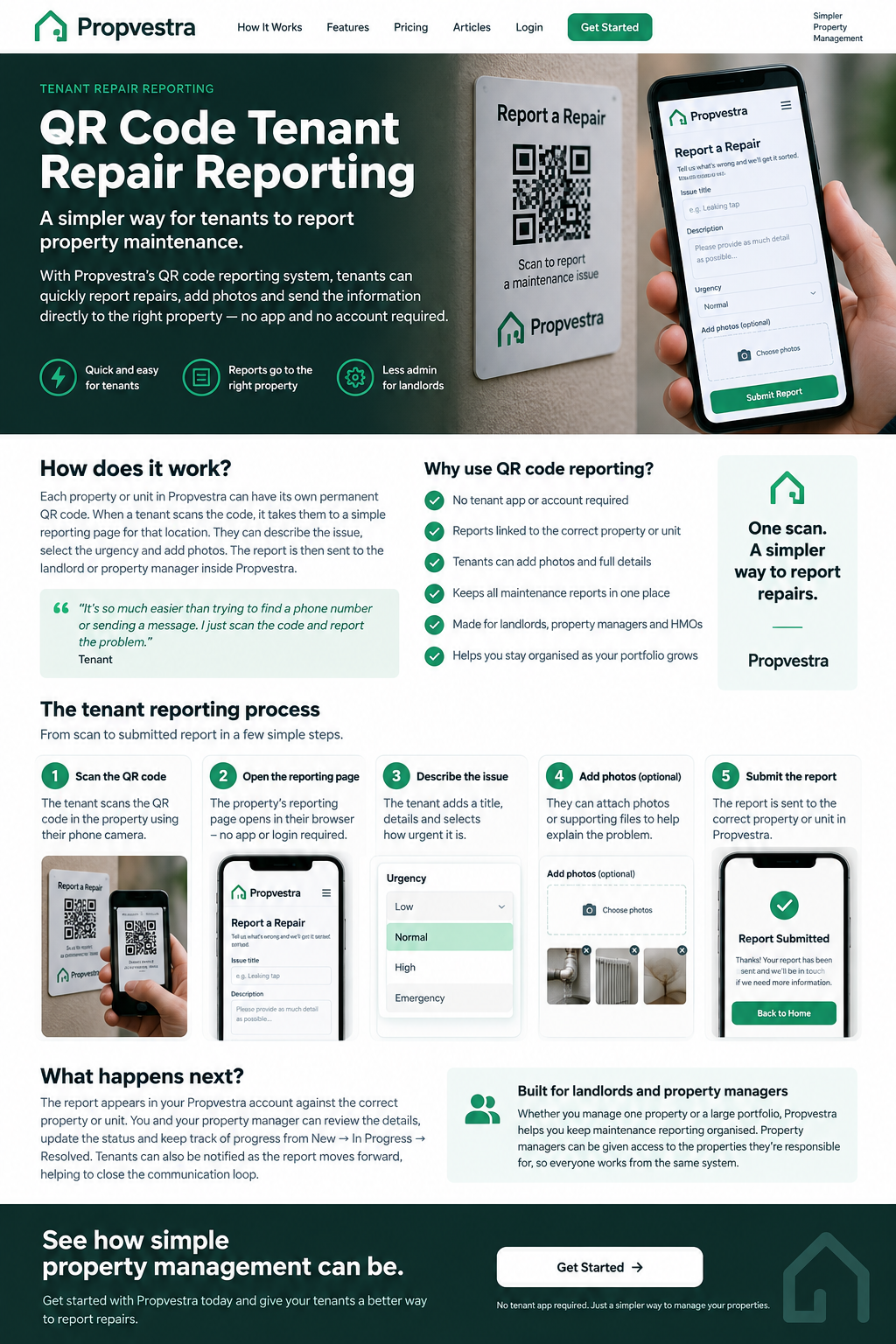
Step 3: the tenant scans the QR code — no app required
Most modern phones can scan a QR code directly through the camera. The tenant scans the code and the Propvestra reporting page opens in their browser.
There is no Propvestra tenant app to download and no tenant account or password to remember simply to report a repair.
That is deliberate. The reporting route should be easy to use at the moment the tenant actually needs it.
Step 4: the tenant explains what is wrong
The tenant now has a structured place to describe the maintenance problem rather than sending a one-line message with no context.
The report can include the issue title, details of what has happened and the urgency selected by the tenant. That gives the landlord or property manager a more useful starting point when they open the report.
It does not diagnose the fault for you. It simply helps collect the information needed to decide what should happen next.
Step 5: photos can be attached to the repair report
A photograph can often explain a property problem faster than several messages backwards and forwards.
If a tenant reports water under a sink, damaged plaster, a broken fitting or another visible problem, attaching a photo can help the landlord understand what the tenant is seeing before arranging the next step.
Photos do not replace an inspection or professional diagnosis where one is needed. Their value is context: the description explains the problem and the image helps show it.
Step 6: the report is already connected to the correct property
This is the part that makes the QR code useful for property management rather than just convenient for the tenant.
Because the tenant entered through that property's QR route, the report can be saved against the correct property or unit inside Propvestra.
For one rental property that may simply save a question. Across a larger portfolio, it helps stop incoming maintenance information becoming a pile of messages that somebody has to manually identify and sort.
How does QR reporting work for HMOs and multi-unit properties?
A single building can contain several reportable locations. If every report only says the main street address, the landlord may still need to work out which room or unit is affected.
Propvestra's property-and-unit structure allows individual reportable units to have their own QR route. A report can therefore be associated with the relevant room, flat or unit rather than being recorded only against the parent building.
That gives the repair useful context from the beginning and makes the maintenance history easier to understand later.
Step 7: the landlord and property manager can work from the same report
Maintenance is not always handled by one person. A landlord may manage some properties directly while a property manager looks after others.
Propvestra allows property managers to be connected to the properties they are responsible for. That means the same incoming maintenance report can sit inside the shared property workflow rather than being copied from a tenant message and forwarded between phones.
For the landlord, the benefit is visibility. For the property manager, the benefit is having the report and its property context in the same place.
Step 8: the repair moves from New to In Progress to Resolved
Reporting a fault is only the first part of the job. Once a report has arrived, its status can be updated as the issue progresses.
Propvestra uses clear maintenance stages such as New, In Progress and Resolved. This helps distinguish a report that has just arrived from one somebody is actively dealing with, and from one that has been completed.
That becomes particularly useful when several repairs are open at the same time. Instead of relying on memory or scrolling back through messages, the current position is visible in the maintenance workflow.
What does each status mean?
New: the report has arrived, linked to its property or unit, ready to be reviewed.
Step 9: tenants can receive progress notifications
A common frustration for tenants is not knowing whether a reported repair has been seen. A common frustration for landlords is repeatedly sending basic progress messages while trying to organise the actual work.
Propvestra can notify the tenant as their report moves through the maintenance process, including status changes such as In Progress and Resolved.
That does not replace a conversation when one is needed. It simply helps keep routine progress communication connected to the repair itself.
Why use a QR code instead of WhatsApp, text messages or email?
WhatsApp, texts and email are useful communication tools. The problem is that they were not designed to organise a property maintenance workflow.
One tenant might send a photograph by WhatsApp, another might email, somebody else might phone, and a property manager may forward another message later. The information exists, but it is spread across different places.
Propvestra does not need to replace every conversation you have with a tenant. The QR reporting route gives maintenance a consistent starting point so the initial report enters the system with the property, description and supporting information together.
Do tenants need to download an app?
No. Tenants do not need to install a Propvestra app or create a tenant account simply to report a maintenance problem.
They scan the QR code and complete the reporting page in their browser. That keeps the tenant side lightweight while the landlord still receives a structured report inside Propvestra.
If you want a deeper explanation of that design choice, see Do tenants need an app to report repairs?
Why photos make the first report more useful
The best maintenance report is not necessarily the longest one. It is the one that gives the person dealing with it enough information to understand the situation and decide what to do next.
Photos can reduce the amount of basic clarification needed after the first report. See why photos make tenant repair reports easier to deal with for more on that part of the workflow.
What changes as a landlord's portfolio grows?
With one property, a landlord may know immediately who every message is from and what address it relates to. That gets harder as more properties, units, tenants and people become involved.
The same QR process still works: each report starts at the property, enters Propvestra in a structured way and can then be handled by the landlord or an authorised property manager.
The value therefore grows with the portfolio. You do not need to invent a completely different maintenance reporting process just because you have gone from one property to ten.
The QR code is simple. What sits behind it is the useful part.
QR codes themselves are not complicated technology, and that is exactly the point. The tenant does not need to understand a new system. They simply scan and report.
Behind that scan, Propvestra connects the report to the property or unit, keeps the issue details and photos together, notifies the people responsible for dealing with it and gives the repair a clear path through to resolution.
For the tenant, it is a simpler way to say “there is a problem here.”
For the landlord or property manager, it turns that first contact into something organised and actionable.
One permanent reporting route. No tenant app. The right property. Better information. A clearer maintenance workflow.
Quick answers
Do tenants need an account or app?
No. They scan the property QR code and complete the reporting form in their browser.
Can different rooms or units have their own QR code?
Yes. Reportable units can have their own QR route, so a report is connected to the relevant room, flat or unit.
Can tenants attach photos?
Yes. Photos can help explain the issue and keep the supporting information with the repair report.
Can I try Propvestra first?
Yes. Free trials are available on the plans shown below. See each card for its trial length. Start your free 30-day trial.
Choose a plan for the units you manage.
Propvestra plans are based on active, reportable units in your portfolio. Compare the unit ranges and monthly prices below, then choose a plan to continue to signup.
30 day free trial Choose plan
30 day free trial Choose plan
What counts as a unit?
An active property marked as reportable counts as one unit. Where a building is organised into individual reportable rooms or flats, each active reportable unit counts. A parent building that is not reportable does not add another unit.
Try the workflow first
Each eligible plan shows its free-trial length alongside the ongoing monthly price. Choose your plan to review the details through the existing signup and checkout process.
Growing your portfolio?
Use the unit ranges to compare the plans as your portfolio changes. For a plan marked “Contact us”, get in touch to discuss your requirements.